Email  
Facebook Twitter Linked In Stack Exchange
Webilicious Logo
  • Services
  • About
  • Portfolio
  • Blog
  • Testimonials
  • Resources
  • Contact

Web Design and Web Development Blog from Webilicious in Tasmania

The Best Shared Web Hosting for Australian Businesses and Organisations

Neil Robertson 05 May 2016

As a web developer, I am wary when contacted by prospective clients who tell me that they have already arranged their web hosting. The selected web hosting company is often not the best choice for various reasons.

Web Hosting Tip:
My number one tip when choosing a web hosting company is to ask your web service provider before purchasing a web hosting plan so they can recommend a plan that is suitable for your particular requirements. Choosing the wrong plan can be a costly exercise!

With Google now including performance as a ranking factor, it is more important than ever to make good decisions about your web hosting provider.

Shared Hosting

Shared web hosting is an affordable web hosting option where your website is securely hosted on the same server as a number of other websites and usually located in a secure data centre.

Shared hosting suits most businesses and organisations with plans typically offering 5GB, 10GB, 25GB or similar storage space often with unlimited monthly bandwidth.

Choosing a Web Hosting Plan

Your choice of web hosting plan and server location depends on a number of factors such as cost, value for money, the geographic location of your target audience and the type of website.

The following plans are the ones I tend to recommend for WordPress, Joomla and similar websites. All of these service providers offer good uptime (reliability), security, performance, technical support and value for money. They also keep their servers up to date so you can always select a supported version of PHP.

DreamIT Host Logo

DreamIT Host has been around since 2016 and offer great value for money business and premium shared web hosting plans.

DreamIT Host offer 24/7 e-ticket support with phone support on some of the more advanced plans. The support team are based in Melbourne.

The choice of server location includes Sydney, Melbourne and Auckland.

With NVMe disk storage and LiteSpeed cache, websites hosted by DreamIT Host load very quickly.

DreamIT Host is an excellent choice for businesses targeting an Australian or New Zealand audience.

ROBTEC Logo

ROBTEC has been around since 2000 and offer great value for money business shared web hosting plans.

ROBTEC offer 24/7 e-ticket support and aim to respond within an hour.

Server infrastructure is primarily in Sydney and performance is excellent with LiteSpeed cache available.

ROBTEC is an excellent choice for businesses targeting a local Australian audience.

UpTime Web Hosting Logo

UpTime Web Hosting was founded in 2018 and offer excellent value for money shared web hosting plans including specialist WordPress hosting plans.

The local e-ticket support is also excellent.

Server infrastructure is in Sydney with very good performance and LiteSpeed cache is available.

UpTime Web Hosting is an affordable choice for businesses targeting a local Australian audience.

VentraIP Logo

VentraIP has been around since 2010 and offer good value for money shared web hosting plans including specialist WordPress hosting plans.

The 24/7 phone and e-ticket local support is excellent.

Server infrastructure is mostly in Sydney and performance is excellent with LiteSpeed cache available.

VentraIP is an excellent choice for businesses targeting a local Australian audience.

FastComet Logo

FastComet has been around since 2013 and offer great value for money shared web hosting plans.

Support is available 24/7.

The choice of server location includes USA, Europe, Singapore and Sydney.

FastComet is an excellent choice for businesses targeting an international audience.

Hawk Host Logo

Hawk Host has been around since 2004 and offer great value for money shared web hosting plans.

Support is available 24/7.

The choice of server location includes USA, Europe, Hong Kong and Singapore.

Hawk Host is an excellent choice for businesses targeting an international audience.

ICDSoft Logo

ICDSoft has been around since 2010 and offer great value for money shared web hosting plans including specialist WordPress, Magento and WooCommerce hosting plans.

Support is available 24/7.

The choice of server location includes USA, Europe and Hong Kong.

ICDSoft is an excellent choice for businesses targeting an international audience.

Other Recommended Web Hosting Companies

For up to date information on the best and worst local web hosting companies, see Web Hosting Down Under and the latest posts in the Web Hosting Forum on the Whirlpool forums.

Web Hosting Companies to Avoid

The following web hosting companies are best avoided as these companies will have your web developer tearing their hair out!

  • Crazy Domains and associated brands including Aust Domains and Cheap Domains.
  • GoDaddy, SiteGround and HostPapa.
  • Internet Service Providers. Some ISPs offer web hosting but this is not one usually of their strengths and the cost is usually overpriced.
  • Melbourne IT and associated brands including AussieHQ, Domainz, Ilisys, Jumba, NETantics, Netregistry, SmartyHost, TPP Wholesale, UberGlobal, WebCentral and Ziphosting.
  • Newfold Digital (includes EIG, Web.com, Dreamscape and Hostopia brands) including Anchor, Aust Domains, Bluehost, Cheap Domains, Crazy Domains, Crucial, Digital Pacific, Dreamscape Networks, Enetica, HostGator, Net Logistics, Panthur, Quadra Hosting, Vodien, Web24 and Webcity. For a full list of Newfold Digital and associated brands, see the article on the Research As A Hobby website.

With frequent mergers and acquisitions, the Australian web hosting landscape changes constantly. For up to date information, see the Web Hosting Companies to Avoid article on Web Hosting Down Under.

Web Hosting Tip:
It is often worth spending a little extra on a better quality web hosting provider to minimise downtime, improve the performance and security of the website, to ensure prompt support is available when it is needed and to ensure your chosen web hosting provider is still around to support you in future.

Website and Web Hosting Performance Check

The longer your website takes to load, the more likely visitors will browse elsewhere. Ideally, web pages should load in less than 4 seconds.

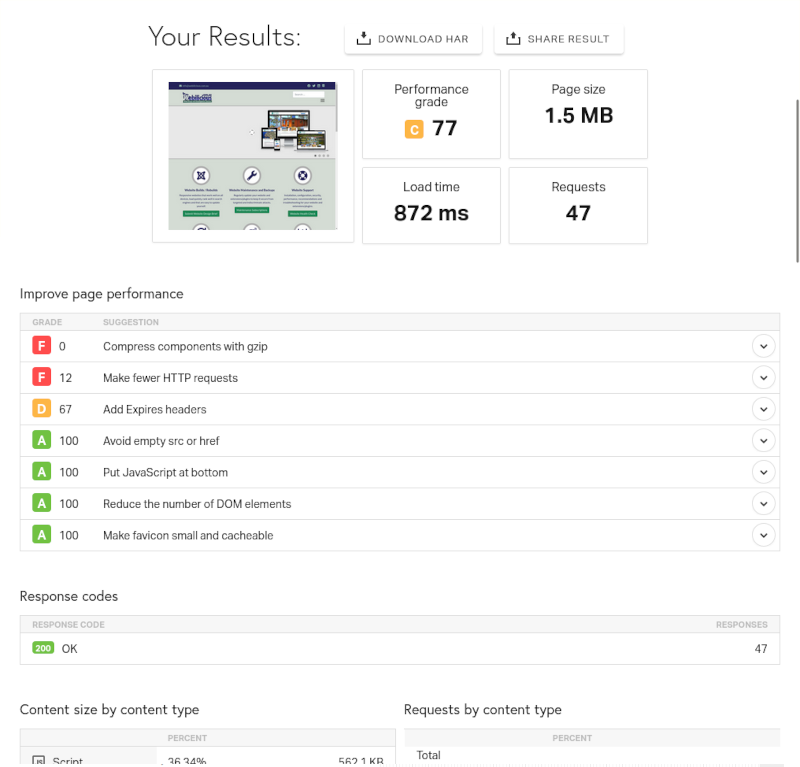
You can test your own website or competitors websites using GTMetrix, Pingdom or similar.

Create a free account on GTMetrix so you can choose which location to run the test from.
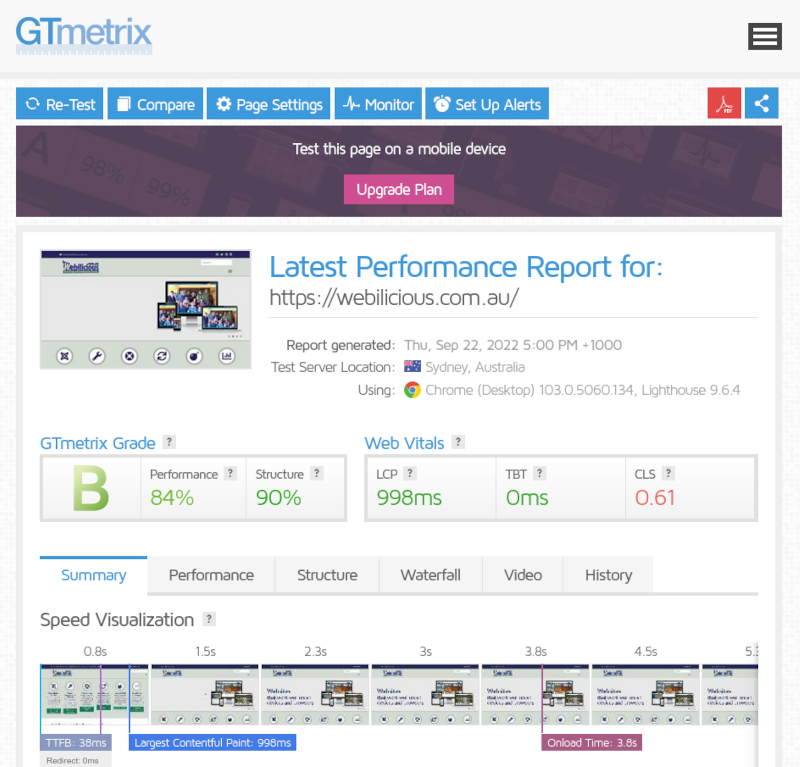
gtmetrix example

pingdom example

Move My Website to a Better Web Hosting Company

Moving a website to a new web host typically takes a couple of hours or around $176 and includes:

  • backing up the current website
  • finding the most suitable web hosting company for your particular website within your budget
  • purchasing a new web hosting plan on your behalf
  • restoring the website to the new web host
  • updating the domain name to point to the new host
  • testing
  • forwarding any orphaned emails on the old host to the new host
  • optionally moving your domain name to the new service provider

Note that you will be moving to a better web hosting company and for most of my clients this is often a cheaper web hosting company so that the cost of the move is soon recovered.

Contact me to enquire about moving web hosts.

Time to Upgrade to a Responsive Template in preparation for "Mobilegeddon" on 21st April

Neil Robertson 30 March 2015

MobilegeddonApparently more than 50% of web searches now originate on mobile devices and Google recently announced that mobile-friendliness will be a ranking signal from April 21st 2015.

Industry experts suggest this change will affect as many websites as the Panda and Penguin algorithm updates and have christened this latest algorithm update, "mobilegeddon".

Responsive Templates

The best way to ensure your Joomla website search ranking is preserved is to implement a responsive template if you don't already have one.

Responsive templates are available for Joomla 2.5 and there were even a few for Joomla 1.5 but Joomla 1.5 and Joomla 2.5 are already "end-of-life" and you should ideally migrate to Joomla 3.x which ships with Bootstrap and already includes some responsive templates.

robots.txt Changes

If you installed Joomla prior to version 3.3, you will likely need to amend your robots.txt file to ensure that Google can access CSS, JavaScript and other files in your template folder to confirm your website is mobile friendly.

Mobile Friendly Testing and Official Instructions from Google

Google has provided a test tool at http://www.google.com/webmasters/tools/mobile-friendly/ so you can check that your website is ticking all the relevant check boxes.

Google has also provided instructions on how best to make your website mobile friendly including specific instructions for Joomla, WordPress and other popular platforms.

More Information

For more information see:

https://www.searchenginewatch.com/2015/03/09/mobilegeddon-is-coming-on-april-21-are-you-ready
https://www.entrepreneur.com/growing-a-business/april-21-is-your-last-chance-for-mobile-optimization-before/244175
https://didit.com/mobilegeddon-tip-of-the-week-examine-your-robots-txt-file

Joomla 2.5 "End of Life" Implications

Neil Robertson 05 February 2015

Official support for Joomla 2.5 ended on December 31st, 2014.

joomla 2.5 end of life

Joomla 2.5 websites will, of course, still operate after this date but security vulnerability fixes may no longer be available and this could place your Joomla 2.5 website at risk.

Joomla 2.5 is becoming increasingly more difficult to support as extension developers concentrate on newer versions of Joomla and drop support for older versions.

Advice for Joomla 2.5 Website Owners

To keep websites secure, Joomla 2.5 website owners should update to the final release Joomla 2.5.28, apply end of life security patches if they haven't already been applied and then migrate to Joomla 3.x as soon as possible.

Apart from official support, other advantages in moving to Joomla 3.x include new features such as tags, version control, improved security, PHP 7 support and custom fields.

The degree of difficulty in upgrading your Joomla 2.5 website to Joomla 3.x will depend on a number of factors including the currently used template, other third party extensions and the content that needs to be brought across.

Migrating from Joomla 2.5 to 3.x

Moving from Joomla 2.5 to 3.x is regarded as a "mini-migration" which involves the following:

  • check the hosting environment is suitable for Joomla 3.x (e.g. PHP 5.3 or later)
  • run backup
  • make a list of third party extensions and check that equivalents are available in Joomla 3.x
  • remove any extensions that are not Joomla 3.x compatible (including templates)
  • update from 2.5.x to 3.x
  • install Joomla 3.x versions of third party extensions (including templates)
  • test and verify that everything has migrated successfully

This process can take anything from an hour or two to a whole day or even longer depending on the complexity of the website and the availability of equivalent Joomla 3.x versions of extensions.

Migrating from Joomla 1.5 to 3.x

Joomla 1.5 website owners are in a similar position to Joomla 2.5 website owners in that Joomla 1.5 is also officially unsupported and potentially vulnerable if new security flaws are found and exploited by hackers.

Joomla 1.5 website owners can migrate directly from Joomla 1.5 to Joomla 3.x using a migration tool such as "SP Upgrade" or similar which is a litle more complicated than the Joomla 2.5 to 3.x "mini-migration". One of the main benefits for Joomla 1.5 website owners moving to the latest version of Joomla is the availability of responsive (mobile friendly) templates that weren't widely available in Joomla 1.5.

More Information

Official Joomla 2.5 to 3.x Step by Step Migration instructions can be found on the Joomla Community website.

Official Joomla 1.5 to 3.x Step by Step Migration instructions can be found on the Joomla Community website.

Webilicious can help with Joomla Migrations.

Migrate My Joomla Website

Migrate from Joomla 1.5 to Joomla 3.x

The cost of migrating from Joomla 1.5 to Joomla 3.x depends on the number of third party extensions and whether there are Joomla 3.x equivalents, whether there is an equivalent Joomla 3.x template and other factors. A straightforward Joomla 1.5 to Joomla 3.x migration typically takes at least five hours and costs from around $450.

Migrate from Joomla 2.5 to Joomla 3.x

The cost of migrating from Joomla 2.5 to Joomla 3.x depends on the number of third party extensions and whether there are Joomla 3.x equivalents, whether there is an equivalent Joomla 3.x template and other factors. A straightforward Joomla 2.5 to Joomla 3.x migration migration typically takes at least three hours and costs from around $250.

Migrate from Joomla 3.x to Joomla 4.x

The cost of migrating from Joomla 3.x to Joomla 4.x depends on the number of third party extensions and whether there are Joomla 4.x equivalents, whether there is an equivalent Joomla 4.x template and other factors. A straightforward Joomla 3.x to Joomla 4.x migration migration typically takes at least four hours and costs from around $350.

Upgrade from Joomla 4.x to Joomla 5.x

The cost of updating from Joomla 4.x to Joomla 5.x depends on the number of third party extensions and whether there are Joomla 5.x equivalents, whether there is an equivalent Joomla 5.x template and other factors. A straightforward Joomla 4.x to Joomla 5.x update typically takes at least one hour and costs from around $88.

Upgrade from Joomla 5.x to Joomla 6.x

The cost of updating from Joomla 5.x to Joomla 6.x depends on the number of third party extensions and whether there are Joomla 6.x equivalents, whether there is an equivalent Joomla 6.x template and other factors. A straightforward Joomla 5.x to Joomla 6.x update typically takes at least one hour and costs from around $88.

Contact me for a quote.

Stewarts Bay Lodge New Website

Neil Robertson 25 October 2014
Stewarts Bay Lodge

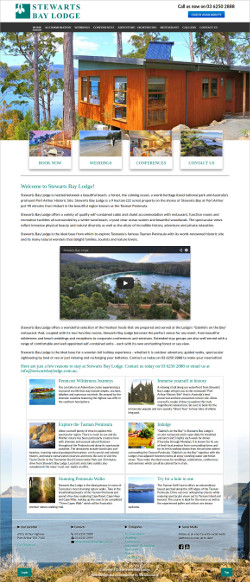
The latest website created by Webilicious® is for Stewarts Bay Lodge standard and deluxe self-contained accommodation including Gabriel's on the Bay Restaurant and Function Centre, Port Arthur's only waterside restaurant. Stewarts Bay Lodge is ideally placed for a holiday exploring Port Arthur and the rest of the attractions on the Tasman Peninsula such as the Tasmanian Devil Conservation Park and Pennicott's Tasman Island Cruises. The 22 acre (9 hectare) property is in a stunning bush location fronting on to Stewarts Bay with access to the beach and within walking distance of the Port Arthur Historic Site.

Web Design

The website is built with Joomla 3.x and a customised RocketTheme template, "Osmosis". I chose Osmosis because I wanted a full width or "fluid" template. The styling has been updated quite extensively and the Stewarts Bay Lodge website looks quite different to the Osmosis demonstration page on the RocketTheme website.

Customisations include (for example):

  • simplification of backgrounds
  • the menu font size and spacing has been optimised for each responsive screen width
  • the main content background has been made transparent to help show off a background image at the bottom of the page
  • a full width slideshow on the home page with a shorter height version on the tablet version of the website and which is not displayed at all on the mobile version of the website
  • amended font styles and colours to match client's paper based marketing material

The website works well responsively with sets of images and information boxes scaling as the screen width varies. On the mobile version of the website, images and information boxes are set to stack vertically one on top of the other at full width.

Web Development

Apart from the standard extensions such as Akeeba Backup and Akeeba Admin Tools that I install on every website, I have installed "AllVideos" plug-in, "Event Gallery", "jPanel", "Noo Google Map" and "Slideshow CK"  which are all free or have free versions.

Event Gallery

This gallery from professional photographer Sven Blüge works well responsively and excels at displaying rows of mixed portrait and landscape images very well together. Social sharing buttons have been enabled so that any image can easily be shared to various social networks.

jPanel Sliding Module

The jPanel module has been selected to display promotions on the website. I feel this is a better option for promotions compared to an intrusive pop-up or similar as the tab is displayed out of the way when the page initially loads but is still obvious to website visitors who may be interested in the latest special offer. The module displays the contents of another module or (as in this case) the contents of a particular article. It is easy for website owners to update the article and to publish or unpublish the module via Module Manager.

Up until the end of November 2014, mention when booking that you saw the special on the website and you can have a free breakfast for 2 people if you book 2 or more nights!

Noo Google Map

Noo Google Map has been used as the location map on the contact page. It works well responsively, looks great and is easy to set up.

Slideshow CK

Used on many of the other websites I have built, Slideshow CK is a favourite because it works well responsively, is W3C compliant and uses lazy loading so that only the first image is loaded when the page loads initially.

Search Engine Optimisation

As usual, basic on-site SEO has been completed using standard Joomla search engine friendly URLs, unique page titles, meta description and meta keywords for each page.

Feel the Quality

Checking the score in the Nibbler test tool reveals a score of 8.7 which I am fairly pleased with.

  1. The Eco-Hamlet, Greenmount
  2. 10,000 Icon Sets Generated
  3. Thanks #JED Contributors
  4. Another Free Online Icon Generator for Favicons and Apple Launcher Icons
  5. Top 10 Developer!

Page 5 of 14

  • 1
  • 2
  • 3
  • 4
  • 5
  • 6
  • 7
  • 8
  • 9
  • 10

Newest Articles

  • Moved Web Hosting from VentraIP to ROBTEC Hosting
  • 2026 Bugmageddon and Why It Might Be Time to Finally Update Your Old Joomla 3 Website
  • At least 10 good reasons to update to Joomla 5 now!
  • Upgrade or Migrate to Joomla 5.x!
  • Joomla 3.x "End of Life" Implications

Popular Articles

  • Kunena Migration from Joomla 1.5 to Joomla 2.5
  • JoomGallery Migration from Joomla 1.5 to Joomla 2.5
  • Another Free Online Icon Generator for Favicons and Apple Launcher Icons
  • PHP 5.6 End of Life Implications for Joomla 1.5 and Joomla 2.5
  • JEvents Migration from Joomla 1.5 to Joomla 2.5
  • Protecting your Joomla Website from Spammers

Subscribe!

Subscribe for website maintenance, security, migration, hosting and seo news and tips.

Trustpilot
Copyright © 2009-2026 Webilicious ® | Locked Bag 2001, Nubeena, Tasmania 7184 | 0414 491 459
Contact | Terms and Conditions | Privacy Policy | Disclaimer | Web Design and Development by Webilicious®
  • Services
  • About
  • Portfolio
  • Blog
  • Testimonials
  • Resources
  • Contact